THE INTERRUPTOR: VST devices download page
Intro - Basics - Effects - Sound Sources and Manipulation - Drum Loops - Bass - Misc.
Club Simulation - VST plug-ins - Build your own Dub siren - Send addition
The mailinglist keeps you updated about additions to the Dub Scrolls:
subscribe unsubscribe
The Dub Discussion Board - Get in contact with producers worldwide!
selected topics: Rhythm Guitar - Live dubbing - DUB culture & philosophy - Recommended Dubs
Links - Guestbook - Interruptor's home page - Interruptor's music -
VST Plug-Ins
I created these VST plug-ins with Synthedit. They run on any VST compatible audio application under Windows. They will not run on mac. Mac users please read this.

If you find yourself using one of these plug-ins regularly please make a donation:
peace, love, unity
Daniel aka The Interruptor

WOW & FLUTTER
A VST plug-in which emulates the playback speed imperfections of the pre-digital era.

download rel 1.0 (1031 KB)

Please post your comments and suggestions regarding this device on the dedicated forum page.
click to enlarge
  • playback speed is modulated in realtime by up to six oscillators
  • intuitive controls: Non-linearly scaled controls allow to directly set the perceived pitch deviation depth and rate resulting from the playback speed modulation.
  • dual mode: In dual mode the left and the right channel are modulated separately.
  • flange mode: When the modulated signal is mixed with the original signal a flanging effect occurs. This feature recalls the times when recording engineers created a flange effect by applying pressure on the tape reel with their hand. Additional controls for feedback and delay allow to create more intense flange effects. Although the unit can be pushed to self-oscillation in extreme settings it will never cause digital clipping thanks to a compressor algorithm inserted into the feedback path.
  • A built-in test tone generator makes it easy to quickly check a particular setting with different signals or to use the plug-in as a self-contained "noise maker".
  • If a control has no influence on the sound in a certain mode it will disappear from the surface.
  • All parameters are controllable by midi controllers.
  • Pop-up hints help to understand the function of each control on the user interface. These appear when the mouse rests over a control.
  • Also the assignment of midi controllers is documented in the pop-up hints.
ECHOLIVE
I built this plug-in for a live performance at the Bazillus Club in Zurich. It features a tap tempo function which makes it easy to create echoes that fit the timing of a live band.

download rel 1.0 (1193 KB)

Please post your comments and suggestions regarding this device on the dedicated forum page.
click to enlarge
  • the delay time can be defined by tapping the tempo with the mouse or on a midi keyboard or midi controller
  • alternatively the delaytime can also be set manually or synchronized with the host application.
  • latency compensation: you can compensate your soundcard's latency for perfectly timed echoes in live applications.
  • tape model including tape saturation, tape hiss, wow & flutter, low and high pass filtering, smooth parameter for continuous delay time changes like on a real tape delay
  • stereo-control: ping pong delay, time symmetry, stereo width
  • all parameters are controllable by midi controllers.
  • pop-up hints help to understand the function of each control on the user interface. These appear when the mouse rests over a control.
  • also the assignement of midi controllers is documented in the pop-up hints
DUB SIREN
Emulates the sounds of those selfmade siren units used by Dub and Reggae Sound Systems like Jah Shaka, Aba Shanti and countless others.

download rel 1.3 (1090 KB)
download rel 1.2 (857 KB)

Please post your comments and suggestions regarding this device on the dedicated forum page.
click to enlarge
  • simple synthesizer architecture with 1 Oscillator and 2 independent LFOs (LFO1: rectified sine LFO2: pulse) additional chopper circuit to mute the sound during the low phase of LFO2
  • tape delay emulation with highpass and lowpass filter in the feedback path. adjustable simulation of tape hiss (useful for endless delays at high tape saturation levels).
  • all parameters controllable by midi (controllers #20 - #32)
TAPE DELAY
On user request I made the tape delay from the DUB SIREN available as a separate plug-in.

download rel 1.2 (839 KB)
download rel 1.1 (669 KB)

Please post your comments and suggestions regarding this device on the dedicated forum page.
click to enlarge
  • highpass and lowpass filter in the feedback path.
  • adjustable simulation of tape hiss (useful for endless delays at high tape saturation levels).
  • all parameters are controllable by midi controllers. the assigned midi cc numbers are written on the front panel beside each pot.
ANALOGIC DELAY
This plug-in mimicks the tape delay in Logic Audio. I created it on request from a friend who switched to another sequencer software after Logic's discontinuation on the PC platform.

download rel 1.1 (780 KB)
download rel 1.0 (706 KB)

Please post your comments and suggestions regarding this device on the dedicated forum page.
click to enlarge
  • tape model including tape saturation, wow, flutter, low and high pass filtering
  • The delay time is not entered in milliseconds but as a notelength (in relation to the song tempo in your sequencer). The Groove parameter allows fine tuning from tripplet to dotted note timing.
  • parameter "Smooth" creates continuous delay time changes like on a real tape delay (no digital clicks when changing delay time during the song)
  • all parameters are controllable by midi controllers.
  • pop-up hints help to understand the function of each control on the user interface. These appear when the mouse rests over a control.
  • Also the assignement of midi controllers is documented in the pop-up hints
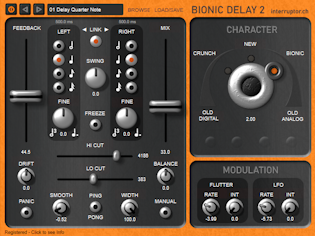
BIONIC DELAY
This enhanced version of the Analogic Delay gives you separate control over the delay times on left and right channel. suitable for ping pong delays and drifting delays

download rel 1.2 (933 KB)
download rel 1.1 (924 KB)

Please post your comments and suggestions regarding this device on the dedicated forum page.
click to enlarge
  • tape model including tape saturation, wow, flutter, low and high pass filtering
  • separate control of delay time for left and right channel
  • The delay time is not entered in milliseconds but as a notelength (in relation to the song tempo in your sequencer). The Groove parameter allows fine tuning from tripplet to dotted note timing.
  • "Drift" parameter gives you the possibility to create delays wandering to the left or to right in the stereo field
  • press the "Ping Pong" button to create delays alternating between left and right speaker.
  • parameter "Smooth" creates continuous delay time changes like on a real tape delay (no digital clicks when changing delay time during the song)
  • parameter "Stereo Width" varies stereo effect from subtle to drastic
  • all parameters are controllable by midi controllers.
  • pop-up hints help to understand the function of each control on the user interface. These appear when the mouse rests over a control.
  • Also the assignement of midi controllers is documented in the pop-up hints
Bionic Delay was used by Coldcut on their album "Sound Mirrors"
Coldcut's Jonathan More says: "Bionic Delay is great for that King Tubby feel." (interview in the February 2006 issue of Remix )
ECHOMANIA
Besides being a CPU hog this plug-in goes further than most (all?) real tape delay machines. It's capable of stereo delays, ping pong delays, multitap delays and complex delay textures.

download rel 1.1 (1566 KB)
download rel 1.0 (1440 KB)

Please post your comments and suggestions regarding this device on the dedicated forum page.
click to enlarge
  • tape model including tape saturation, tape noise, flutter, low and high pass filtering
  • 4 separate delay lines which can be configured for various delay types (Try out the preset programs as examples. Also see the included signal diagram "diagram.jpg" to understand the structure of this effect)
  • delay times can either be defined in milliseconds or in relation to the song tempo in your sequencer. (switchable for each delay line)
  • all parameters are controllable by midi controllers.
  • pop-up hints help to understand the function of each control on the user interface. These appear when the mouse rests over a control.
  • Also the assignement of midi controllers is documented in the pop-up hints
Dub home - Interruptor home